Word Yoga - Word Game
- 4.8
- Rating
- 500.00K
- Installs
- Free
- Price
 Analysis by App-foxy
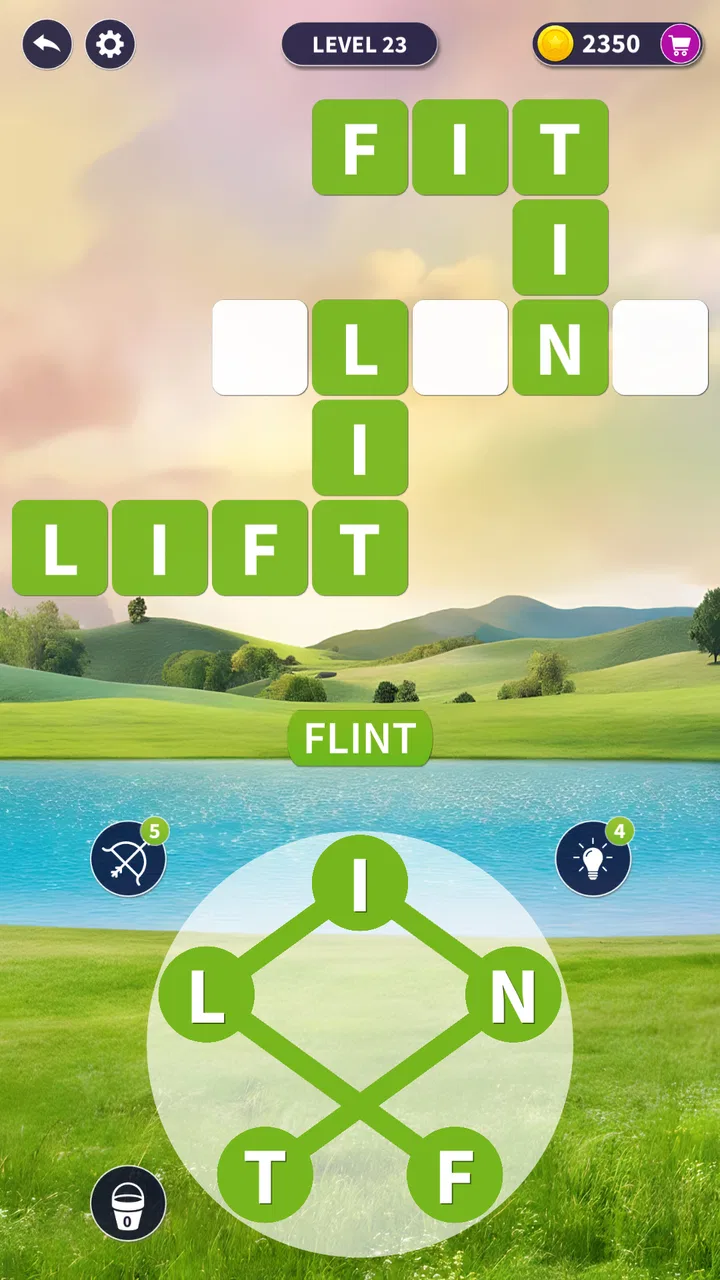
I approached Word Yoga as the kind of word game I could open for a few quiet minutes rather than a title that demands a long session. Its central idea is easy to understand: work with letters, solve word puzzles, and gradually improve your ability to spot useful combinations. That simplicity is its biggest invitation, but it also means the quality of each session depends on how clearly the puzzle communicates what it expects from me.
Developed by Marul Games, this free word game sits in the casual puzzle space and is suitable for Everyone. It has already passed the half-million-install mark, with an average rating of 4.8 from roughly 2.9 thousand ratings. Those figures suggest that the straightforward format has found an audience, although a high rating alone cannot tell you whether the pacing, difficulty, or monetization style will match your habits.
My experience is best described as relaxed but attentive. I can pick it up without learning a complicated control scheme, yet solving the better puzzles still asks me to slow down and look at letters differently. If you enjoy word searches but want something more focused than simply scanning a large grid, this is an appealing place to start. If you need a deep vocabulary tool, competitive multiplayer, or a completely interruption-free experience, you should approach it with more caution.
You May Also Like

 Blood Strike: 2.5 Anniversary
Blood Strike’s Loadouts Turn Every Drop Into a Tactical Gamble
A close look at Blood Strike’s custom loadouts: how fast access to signature weapons reshapes its battle royale rhythm, rewards preparation, and narrows the gap between fights.

 Pandora - Music & Podcasts
Pandora’s Music Is Easy to Start, but Harder to Recover
Pandora’s strength is its low-effort path from a seed to a station. Its weak spot is how much confidence it asks you to place in connection, setup, and quiet recovery.

 8 Ball Pool
 Is Built on Rivalries, Rematches, and Routine
A close look at the rivalries, rematches, shared routines, and unanswered safety questions that turn a quick pool match into a persistent mobile community.

 Samsung Music
’s Quiet Strength Is Playing What You Already Own
Its reach comes less from spectacle than from dependable access to a personal library. That simplicity is both the app’s strongest retention engine and its ceiling.

 AccuWeather: Weather Radar
AccuWeather Review: A Quick, Clear Forecast for Everyday Decisions
For everyday plans, the best forecast is the one you can understand quickly. AccuWeather makes rain timing, radar, and local conditions easy to act on, with a few trade-offs.

 Hill Climb Racing
Why Hill Climb Racing Still Turns Crashes Into One More Run
A tiny car, a bumpy hill and one more upgrade: Hill Climb Racing keeps resurfacing because its simple chaos makes every near-miss feel personal.
More From Our News Desk



Where the first sessions can become confusing
The main stumbling point is not learning how to play; it is understanding what kind of answer the current puzzle is encouraging. A player may see a group of letters and immediately try the most obvious short words. That can work early on, but it is not always the best habit. I found it more useful to look for common beginnings and endings first, then consider whether the remaining letters can form a longer or less obvious word.
This matters because word games can feel unfair when the player is using a reasonable strategy that the puzzle does not reward. When I get stuck, I do not assume the game is broken. I first check whether I am treating every visible letter as equally important, or whether I am repeatedly testing the same familiar combinations. A short pause often helps more than random tapping.
Another source of friction is the difference between recognizing a word and entering it correctly. On a small phone screen, quick swipes or taps can be less precise than expected, especially when several letters sit close together. I get better results by moving deliberately and watching the path rather than trying to rush through a promising answer. That small change makes the game feel more consistent.
The useful mindset is to solve the structure before chasing speed. I look for patterns, test a likely word once, and then move on if it does not fit. That prevents a single stubborn answer from turning a short break into a frustrating guessing session.
Why familiar words do not always carry the puzzle
Word Yoga is more enjoyable when I treat it as a pattern-recognition exercise instead of a test of obscure vocabulary. The challenge often comes from rearranging my attention: I may know the letters, but I am looking at them in the wrong order or grouping them too narrowly. This makes the game accessible to casual players while still giving experienced word-game fans a reason to think.
There is also a trade-off here. Players who enjoy discovering less common words may appreciate the mental stretch, while players who expect every answer to be immediately obvious may interpret that same stretch as poor guidance. I would not recommend playing while distracted if you are easily annoyed by a puzzle that requires several attempts. The format rewards patience more than frantic input.
What I check before blaming the game
Before starting a longer session, I make sure the phone is responding normally. If taps register late, letters appear to be skipped, or a swipe stops unexpectedly, I test another app briefly. That simple comparison separates a puzzle-solving problem from a touch-screen or device-performance issue. It is a particularly useful check on older phones, where background activity can make any casual game feel less responsive.
I also close anything that is visibly consuming attention, such as a video, a navigation app, or a large download. I am not claiming that Word Yoga requires unusual hardware; rather, a clean session makes it easier to judge the game itself. When the phone is busy, a missed gesture can look like a puzzle mistake, and that leads to unnecessary retries.
The game is free to install and play, but in-app purchases range from $0.99 to $84.99 per item. That broad range is worth remembering before spending. I would decide in advance whether I am comfortable making a small optional purchase, rather than tapping through a moment of frustration. A difficult puzzle is exactly when a player is most likely to make an impulsive decision.
For families, the Everyone content rating makes the game a reasonable candidate for shared casual play. I would still explain purchases to younger players and keep the decision with the account owner. The age rating describes the intended audience, but it does not remove the need for ordinary device and payment supervision.
Small setup habits that improve the experience
I recommend beginning with a stable connection if the game behaves differently from one session to the next, even though a temporary connection issue does not automatically mean the puzzle itself is at fault. If a screen takes longer than usual to respond, I wait rather than repeatedly pressing the same control. Repeated input can create more confusion when the device catches up.
Keeping the app updated is another sensible step. The current version is 1.3.6, and I use that version information when checking whether my installation is current. The game supports Android 7.0 and later, so compatibility is broad, but an older operating system can still bring unrelated performance limitations. I would not treat minimum compatibility as a promise that every older device will feel equally smooth.
On iOS or Android, my general approach is the same: install from the platform’s official app marketplace, allow the installation to finish, and open the game only after the device has returned to normal. I avoid judging a title during the first seconds after a fresh install because phones sometimes complete background setup work at the same time.
Recovering a session when progress feels stuck
When I cannot solve a puzzle, I use a fixed recovery routine instead of guessing endlessly. First, I reread the available letters without touching the screen. Second, I search for common word shapes, including a likely ending or a repeated sound. Third, I try a different order of attack: if I started with short words, I look for a longer construction; if I focused on the center of the puzzle, I inspect the outside letters.
This method is more useful than repeatedly entering the same answer because it changes the question I am asking. I am no longer thinking, “Which word am I missing?” I am asking, “Which letters have I ignored, and what pattern could connect them?” That shift is one of the more valuable lessons the game offers, especially for anyone who wants to become quicker at word puzzles generally.
If an input appears not to register, I stop and check whether the gesture began on the intended letter. I then try one careful entry rather than several rapid attempts. If the same problem happens outside the game, I investigate the phone’s touch response. If it happens only once in Word Yoga, restarting the current session may be enough to clear a temporary input problem.
I would avoid uninstalling immediately if I care about current progress. Reinstallation can remove local information in some apps, and I would rather try ordinary recovery steps first: leave the puzzle, close the game normally, reopen it, and confirm whether the issue returns. I cannot promise that every progress problem will resolve this way, but it is the least disruptive sequence.
How I use hints without weakening the challenge
When a hint or assistance option is available in the moment, I prefer to use it as a learning prompt rather than a full solution. I ask myself what the revealed clue tells me about the remaining letters, then attempt the next part independently. This keeps the puzzle active instead of turning the entire level into a passive reveal.
There is a practical reason to be selective. If I use help at the first sign of difficulty, I lose the chance to notice the pattern that caused the problem. If I wait until I have tested several sensible possibilities, assistance becomes more informative. For me, the best time to use it is when I have identified the likely word family but cannot determine the final arrangement.
Players should also consider the difference between a puzzle that is genuinely beyond their vocabulary and one that is simply poorly timed. When I am tired, I make more mistakes with easy letter groups. Taking a break often saves more time than forcing another attempt. This is a good game for short pauses precisely because there is no benefit in pretending every session must be completed in one sitting.
When restarting helps, and when it does not
Restarting can help after an interrupted session, a delayed response, or a screen that no longer reflects the last input. It will not improve a puzzle that I have misunderstood. If the same answer continues to fail after a clean restart, I return to the letters and examine my assumptions rather than repeating the reset.
I also check whether another person has changed the device settings or whether the phone is in a mode that affects touch behavior. Accidental screen rotation, an active overlay, or a nearly full device can create symptoms that look like an app fault. The sensible order is to isolate the problem before making a bigger change.
When the app is not the cause
Not every delay, missed gesture, or failed installation belongs to Word Yoga. A weak connection can affect downloads or interruptions, while a crowded device can slow every app. A screen protector can reduce touch sensitivity, and an aging battery can cause the phone to limit performance. These are ordinary possibilities, but they matter because word games make small input errors highly visible.
My quickest test is comparison. I open a simple app, type a short message, or scroll through a webpage. If taps and swipes fail there too, I focus on the phone rather than the game. If other apps behave normally, I update Word Yoga, close it fully, and try again. This avoids wasting time searching for a puzzle solution when the actual issue is technical.
Storage is another overlooked factor. Even when an app is already installed, a device with very little free space can behave unpredictably during updates or temporary processing. I would clear ordinary clutter before deleting the game, especially if I want to preserve progress. The same principle applies to operating-system updates: keeping the phone in a supported, stable state is more useful than assuming every problem comes from one title.
For users on Android 7.0 or a later release, compatibility should be broadly available, but the age of the device still matters. A phone that technically meets the requirement may have a slower processor, weaker touch panel, or limited memory. That does not make the game unsuitable, but it changes my expectations. I would favor shorter sessions and fewer background apps on older hardware.
Who gets the most from this word-game format
I think Word Yoga works best for people who enjoy calm, repeatable mental exercises. It suits a commuter with a few spare minutes, a student looking for a vocabulary-adjacent break, or someone who likes the satisfaction of arranging letters without committing to a long campaign. The Everyone rating also makes it easier to consider for mixed-age households, provided purchases are handled by an adult.
One realistic use case is a short evening routine. I might play a few puzzles after putting my phone away from social feeds, using the game as a focused alternative to endless scrolling. I would stop when I notice myself entering random combinations. At that point, the activity has stopped being relaxing, and another break would serve the purpose better.
It is less suitable for someone seeking a dictionary with definitions, pronunciation, or structured language lessons. It is also not the first choice for a player who wants a large competitive community, direct head-to-head matches, or a story-driven progression system. Traditional crossword apps may be better for clue-based solving, while large word-search games may suit people who prefer visual scanning over letter arrangement.
The comparison with those alternatives clarifies the appeal. A crossword usually gives me a clue and asks me to retrieve an answer; Word Yoga makes me work from available letters and discover the answer through combinations. A standard word search often emphasizes finding words hidden in a grid; this game places more weight on forming or recognizing possibilities. Neither approach is universally better, but the distinction helps set expectations before downloading.
What the developer and current release mean for a new player
Marul Games has positioned this as a focused word title rather than a complicated multi-genre product. The current release, version 1.3.6, is the one I would look for when installing, because using an older build can make troubleshooting needlessly difficult. The game was released on September 15, 2024, so it is still a relatively recent option for players browsing casual word titles.
The rating of 4.8 and roughly 54 written reviews present a positive first impression, but I would read that signal alongside my own priorities. Ratings can tell me that many players enjoy the basic experience; they cannot guarantee that the difficulty curve, input feel, or purchase choices will suit me. I see the strong reception as a reason to try the free version, not as a reason to ignore the limitations of the format.
The purchase range deserves the same balanced treatment. Free access lowers the barrier to testing the game, while optional items may appeal to players who want extra convenience. I would keep spending modest unless I had already played long enough to know that the game belongs in my regular rotation. A free download is valuable here because it lets me make that decision from actual use rather than from the store summary alone.
My practical verdict after using it
Word Yoga is a good recommendation for a reader who wants a clean, approachable word puzzle and is willing to solve thoughtfully rather than rush. I like that the basic idea is immediately understandable, yet the letter combinations can still make me pause. The strongest part of the experience is the small mental reset it provides: I leave behind notifications and focus on a limited set of possibilities.
My reservations are equally practical. Short word puzzles can become repetitive if I need richer variety, and players who dislike hints, purchase prompts, or any form of optional spending may prefer a paid title with a simpler model. The game also cannot compensate for a sluggish phone, an unreliable touch screen, or a distracted playing environment. Those factors can make a fair puzzle feel awkward.
I would install it first on a compatible device, play without spending, and use the recovery routine above whenever I get stuck. I would check the phone itself before blaming an unresponsive gesture, update to version 1.3.6, and decide about purchases only after several genuine sessions. My recommendation is simple: try it if you want a free, casual letter challenge, but skip it if you are looking for a full language-learning tool or a competitive word platform.
In the end, this is a modest game with a clear purpose, not a replacement for every other word activity. Its value comes from making a few minutes feel more focused, especially when I approach each puzzle patiently and keep technical problems in perspective. For that specific use, I would happily suggest it to a friend who enjoys discovering words one careful combination at a time.
FAQs for Word Yoga - Word Game
01What is Word Yoga - Word Game about?
Word Yoga - Word Game is a unique blend of word puzzle and relaxation game designed to enhance your vocabulary while providing a calming experience. Players are tasked with forming words from a set of letters, progressing through levels that increase in difficulty. The serene background music and visuals aim to create a peaceful environment, making it perfect for unwinding after a long day.
02Is Word Yoga - Word Game suitable for all ages?
Yes, Word Yoga - Word Game is suitable for players of all ages. The game’s simple mechanics make it accessible for young children, while the increasing difficulty and extensive vocabulary challenges are engaging for adults. It’s a great educational tool for kids to enhance their language skills, and equally enjoyable for adults seeking a relaxing yet stimulating activity.
03Does Word Yoga - Word Game require an internet connection?
Word Yoga - Word Game can be played offline, making it an excellent choice for users who wish to enjoy the game without relying on a stable internet connection. However, certain features like leaderboards and daily challenges might require online access to update scores and provide fresh content.
04Are there in-app purchases in Word Yoga - Word Game?
Yes, Word Yoga - Word Game offers in-app purchases. While the game is free to download and play, players have the option to purchase hints, remove ads, or unlock additional levels and themes. These purchases are entirely optional and are designed to enhance the gaming experience without hindering progress for those who choose not to spend money.
05How does Word Yoga - Word Game ensure data privacy?
Word Yoga - Word Game prioritizes user privacy by adhering to stringent data protection regulations. The app collects minimal personal information, primarily for enhancing gameplay and providing a personalized experience. Users can review the privacy policy within the app to understand what data is collected and how it is used, ensuring transparency and security.
Pros
- Engaging puzzles enhance vocabulary skills.
- Simple interface
- easy to navigate.
- Daily challenges keep content fresh.
- No internet required for gameplay.
- Relaxing background music enhances experience.
Cons
- Limited hints available for difficult levels.
- Ads can be intrusive and frequent.
- In-app purchases can be pricey.
- Some puzzles may feel repetitive.
- Lacks multiplayer or social features.

Word Yoga - Word Game
Gallery